How to make Pip part of the lesson, not extra admin
A simple lesson-time routine for teachers to review a student’s practice, update their next plan and send it before they leave—without creating extra work afterwards.
By Chip Horne • Updated
Right from the very first prototypes, making Pip efficient for teachers has mattered to me just as much as making it motivating for students.
If you teach back-to-back lessons, you know how quickly even a small extra task can turn into a lot of unpaid work. Pip should fit into the lesson—not leave you with another job to do afterwards. The most efficient way to use it is not to write your usual notes and transfer them into Pip later. It is to make Pip the place where you capture the guidance you are already giving.
The basic routine is simple:
Open Pip before the lesson
Update the practice plan as you teach
Save and send before they leave
1. Open Pip before the lesson
Open the student’s page on your laptop, tablet or phone while they are coming in, assembling their instrument or finding their music.
A quick glance can tell you:
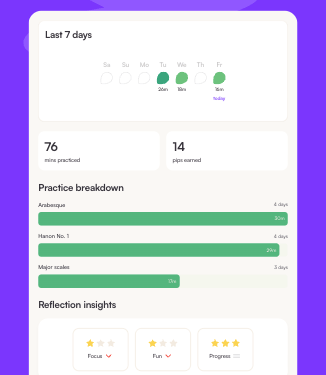
- whether they practised, and on which days;
- which activities received attention;
- what their Reflection insights suggest about their focus, enjoyment and sense of progress;
- whether they flagged anything for help;
- what was in their previous practice plan.
This should take seconds, not become a new form of lesson preparation. The aim is simply to begin with a little more context. You might say, “I saw you spent some time on this—how did it feel?”
The information is a starting point for a conversation, not a substitute for hearing the student play. Having Pip open also shows the student that you have noticed their work between lessons, which can strengthen their sense of ownership and accountability.
2. Update the plan as you teach
Keep the student’s plan open beside the music stand and treat Pip as your lesson notebook.
If the student is working on a piece, scale or exercise, open that activity. When you would normally jot something in a practice book, capture it in Pip instead. Add a new activity when it arises, amend an existing instruction when the focus changes and remove something when it no longer belongs in the coming week’s practice.
This avoids creating two versions of the same notes—and the need to remember what happened when the lesson is over.
It can be useful to discuss the wording with the student as you write it. They are the person who will need to understand it at home, so ask them whether the instruction is clear or invite them to put the important point into their own words.
Pip does not need to replace everything you already do. Keep writing fingerings, bowings, breath marks and other annotations directly on the music when that is the most useful place for them.
Start with the previous plan
With Pip, you never need to rebuild a student’s practice plan from scratch. Every new plan starts with their previous activities already in place.
You can simply:
- keep anything that still needs work;
- make a quick change where the student has progressed;
- add new material;
- remove anything that the student does not need as part of the coming week’s practice.
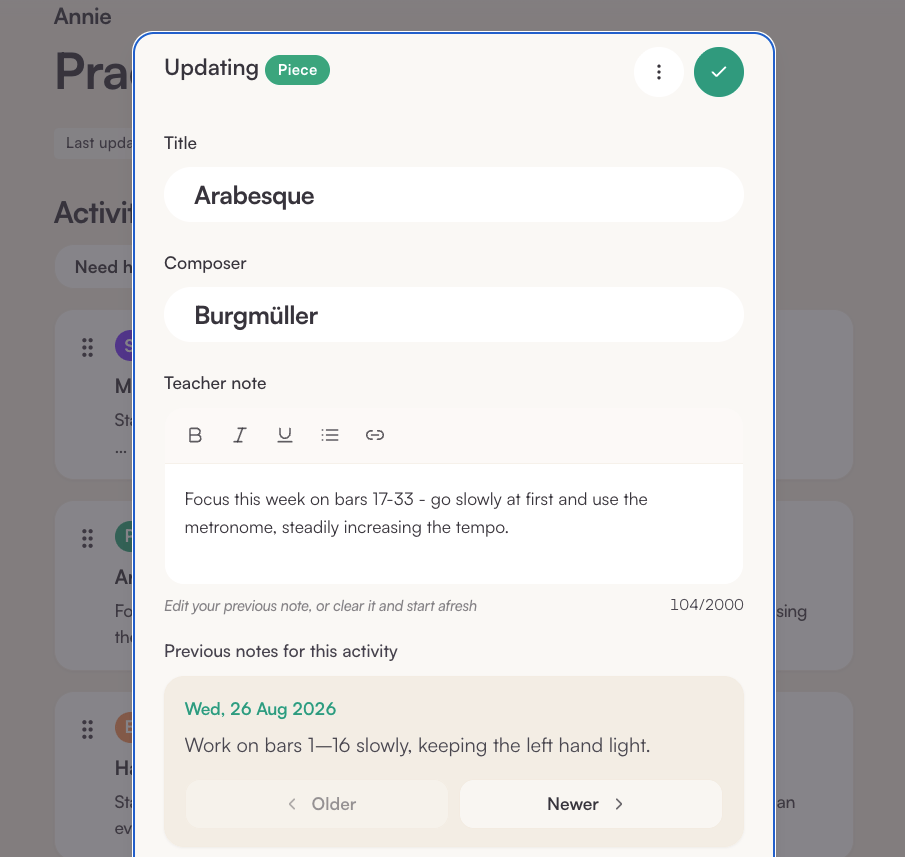
You can delete an old instruction from the current activity without losing the history. Both you and the student can still find earlier notes on the specific activity under Older, and all previous practice plans remain available.
Write reminders, not lesson reports
A practice plan does not need to record everything that happened in the lesson. It only needs to tell the student what to work on and remind them of the important things they might otherwise forget.
Short, specific instructions are usually more useful at the instrument than a paragraph of prose. For example:
Bars 17–24: slowly, hands separately. Keep the left hand light and aim for an even pulse.
That gives the student a clear starting point, a manageable section and something musical or technical to notice. You do not need to repeat information that is already obvious from the score.
A useful question is: What will this student need to remember when I’m not sitting beside them?
Dictate when speaking is quicker than typing
Your notes do not need to be polished prose. If typing interrupts the flow of the lesson, try your device’s voice-to-text function.
On an iPhone or iPad, tap the microphone on the keyboard and speak directly into any text field. On a Mac, go to Apple menu → System Settings → Keyboard → Dictation to turn dictation on and choose a shortcut. You can then click into a field in Pip, use the shortcut and speak the instruction.
It may take a little getting used to, and it is worth checking names and musical terms before sending the plan. But for some teachers, dictating one clear sentence is much quicker than typing it.
A small Bluetooth keyboard can also make using Pip on a tablet more comfortable.
Demonstrate instead of over-explaining
Some musical ideas are much easier to show or play than to describe.
A short video can capture a fingering, bow hold, embouchure, movement or demonstration of a passage. An audio note may be enough for a rhythm, articulation, pronunciation or sound that the student should aim for. It can also work well when you want to give a longer explanation that would be cumbersome to read.
Quick tip for filming in selfie mode: On an iPad or phone, go to Media and tap Upload rather than Record. This opens your device’s camera, where you can switch to the front-facing camera. At the moment, Record only uses the rear camera.
These recordings do not need to be polished. Ten or twenty focused seconds may be more useful than a long paragraph. You can prop up your device, use a music stand or ask the student to hold it so the relevant angle is clear.
If you demonstrate something regularly, record it once outside Pip and save it somewhere easy to find. You can then reuse it with other students. The same applies to PDFs, worksheets, backing tracks and exercises.
Media earns its place when it makes practice easier to begin or your intention easier to understand. If a short written reminder will do the job more efficiently, use that.
3. Save and send before they leave
Use the final minute or two of the lesson to look through the plan together.
Ask the student to explain what they are going to do first when they practise. This checks that your shorthand makes sense, reinforces the priorities you agreed and helps the student leave with a clear plan rather than a vague memory of the lesson.
Then tap Save and send while they are still with you wherever possible. If necessary, you can save the plan as a draft and return to it later. But the best routine is one in which the plan is ready when the student leaves. Pip is there to capture the guidance you already give and make it easier for the student to act on—not to leave you with a pile of plans to finish at the end of the day.